The AI Agent That Works Directly in Your Simulation Workflow
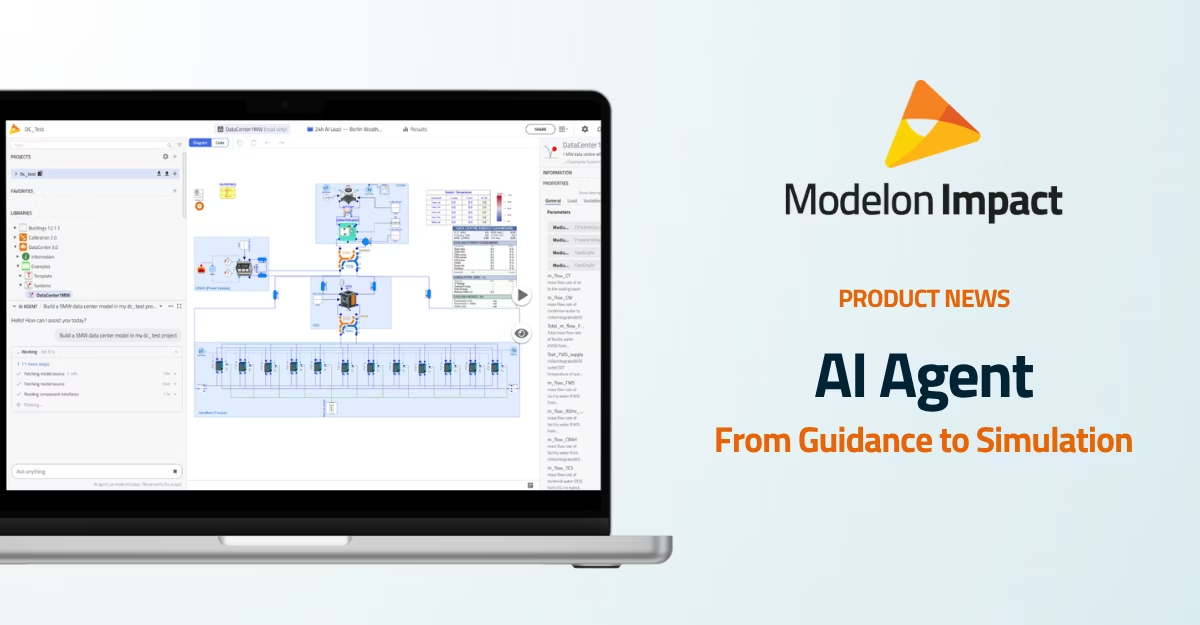

Modelon Impact’s AI Assistant is becoming an AI Agent. Built into the simulation platform, the Agent can now help engineers build and edit models, resolve errors, run experiments, analyze results, and create plots directly within their workspaces.
When Modelon introduced the AI Assistant in Modelon Impact, the goal was to make simulation easier to navigate. The Assistant helped users find relevant models and components, understand platform workflows, and troubleshoot compilation and simulation issues. The next step is more significant.
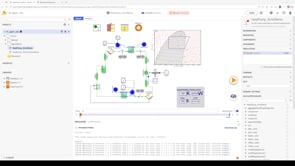
The new Modelon Impact AI Agent moves from advising engineers to helping them carry out the work. Instead of explaining what a user should change in a separate chat, the Agent works directly with the models, experiments, libraries, and results in the user’s Modelon Impact workspace.
That distinction matters. Engineering simulation rarely ends with a single answer. Solving a problem may require modifying a model, running several diagnostic cases, comparing results, calculating a key performance indicator, or configuring a Design of Experiments. With a generic AI assistant, the engineer remains responsible for moving information between the AI and the engineering tool at every step. The Modelon Impact AI Agent brings those activities together in one integrated environment.
More than assistance: AI that takes action
A conventional AI assistant can explain an error or recommend a possible next step. The Modelon Impact AI Agent can help apply that next step to the engineering workflow. Users can describe what they need in plain language. Depending on the task, the Agent can:
- Turn results into plots and reports for review
- Find a suitable model in an existing library or help build a new one
- Read and edit Modelica models directly in the workspace
- Diagnose compilation errors and failed simulations
- Apply proposed fixes and rerun the model
- Investigate slow-running simulations
- Configure and run Design of Experiments studies
- Perform post-processing and calculate engineering KPIs
- Turn results into plots and reports for review
The result is not simply a more conversational way to use simulation software. It is a more connected way to move from an engineering question to a simulation workflow.
Work directly in the model without manual copy-paste
Using an external LLM for simulation support places an additional burden on the engineer. The engineer must determine which section of Modelica code, compiler message, model configuration, or simulation result is relevant. That information must then be copied into the chat with enough background for the LLM to interpret it.
If the recommendation involves a diagnostic simulation, the user must return to the modeling tool, make the change, run the model, collect the result, and bring the new information back to the LLM. A multi-step investigation can require this cycle several times.
The AI Agent eliminates many of those manual handoffs because it is built into Modelon Impact. It works with the engineering context already available in the workspace and can use Modelon Impact’s modeling, simulation, scripting, and visualization capabilities directly. Fixes can be applied and tested where the work is happening, rather than merely described for the user to implement elsewhere.
Bring simulation to more engineers
System simulation often depends on a small number of specialists. These experts understand Modelica, know which components to select, recognize the important compiler messages, and can determine which experiments will answer a particular engineering question. Design engineers may have the questions simulation can answer, but not the specialized knowledge required to prepare and run the study. As a result, they may have to wait for expert support or make a design decision without simulation.
The AI Agent is designed to lower that barrier. Users can describe the engineering task in plain language while the Agent handles more of the underlying model setup, debugging, experiment configuration, and analysis.
Simulation specialists also benefit. By shifting more routine model setup, debugging, and analysis work to the Agent, experts can spend more time developing new models, reviewing challenging applications, and improving the engineering methods available to the wider organization.
Apply Modelica skills developed by Modelon experts
General-purpose LLMs begin with broad language and coding capabilities. They do not automatically understand how a particular simulation platform, Modelica library, or engineering workflow should be used. The Modelon Impact AI Agent combines access to the platform with Modelica skills developed by Modelon experts. These skills provide structured methods for tasks such as model building, debugging, slow-simulation diagnosis, experiment setup, and result analysis.This helps the Agent spend more effort on the engineering task and less effort rediscovering how to interact with the simulation environment. It also makes expert practices easier to apply consistently across projects and users.
The Agent can work with validated Modelon libraries, customer-developed models, and physics-based system models in Modelon Impact. These engineering assets provide a stronger foundation for simulation than an LLM response alone. Importantly, this does not mean that every AI-generated change or result is automatically validated. It means engineers can combine AI-enabled workflows with trusted physics-based models and validated library content, while retaining the ability to inspect and approve the Agent’s work.
Move beyond model creation and debugging
Agentic capabilities in Modelon Impact extend beyond working with Modelica code. The Agent can also help execute the broader workflows that engineers use to evaluate designs.
A user can ask the Agent to vary selected parameters, configure a Design of Experiments study, run the required cases, calculate KPIs, and create plots that reveal the relevant tradeoffs. Custom analysis is performed through scripts that can access Modelon Impact data APIs, enabling the Agent to post-process simulation data and produce values, visualizations, and reports for the user to review.
Keep engineering work visible and traceable
An AI Agent should not become a black box inside the engineering process. Engineers need to understand what changed, how calculations were performed, and how a result was reached.
The Modelon Impact AI Agent is designed to show its work:
- Proposed model edits are presented as reviewable differences.
- Model changes require user approval.
- Calculations expose the code used to produce them.
- Results are saved with the engineering work.
- The Agent runs with the user’s workspace and permissions.
- Script execution occurs in an isolated user environment.
These capabilities help engineering teams maintain visibility and control while using AI to accelerate the workflow.
A more practical AI experience for everyday simulation
The release also introduces improvements that make the Agent easier to use during ongoing project work.
Each workspace can maintain its own chat history, and users can start, search, rename, and delete conversations. Separate histories reduce the risk of bringing the wrong project context into a new task. Multiple conversations can run in parallel, and responses can continue if a connection is temporarily interrupted.
The release also improves performance when working with large models. In internal testing with a model containing approximately 174,000 variables, the results variable list appeared immediately instead of taking about 24 seconds to load. Interaction with models containing many animated icons has also been improved.
From AI guidance to agentic simulation
The transition from AI Assistant to AI Agent reflects a broader shift in engineering AI. The value of AI does not stop at answering a question. It grows when the AI can work with the tools, models, experiments, and engineering methods needed to test the answer.
By combining an integrated AI Agent with physics-based system simulation, Modelon Impact helps more engineers move from questions to working models and reviewable results. Simulation experts can spend less time on routine setup and troubleshooting. Design engineers can use simulation more directly. Organizations can apply validated models and expert-developed practices more consistently across their teams.
The AI Agent does not replace engineering judgment. It gives engineers a more capable way to put that judgment into action.